Best Group Messaging Apps for Party Planning: Our Top Picks for Stress-Free Travel Coordination
Introduction
You’ve got the crew, the destination, and the vision. Now you need a command center that won’t turn into a chaotic message thread where half the group is scrolling through three-hour-old texts looking for the hotel address. That’s where the best apps for group travel come in. The right messaging app isn’t just about sending emojisâit’s about keeping everyone on the same page, splitting costs without awkwardness, and making sure the party actually happens when and where you planned it.
If you’re here, you’re past the ‘thinking about it’ stage. You’re in active research mode, comparing options, and figuring out what works for your specific group. Maybe you’ve got twelve people trying to coordinate flights from three different cities, or maybe it’s a bachelorette weekend with a packed itinerary. Either way, bad app choices lead to missed messages, lost reservations, and that one friend who ‘didn’t see the poll.’ This guide cuts through the noise and gives you the real-world breakdown of which app fits your trip’s vibe, size, and complexity.

What to Look For in a Group Messaging App for Party Planning
Before we explore the apps themselves, let’s set the criteria. Party planning is a specific beast. You’re not just chattingâyou’re sharing flight confirmations, dropping venue links, collecting cash for deposits, and trying to get twelve opinions on dinner without starting a civil war. Here’s what actually matters when you’re picking a platform.
Platform compatibility is essential. If your group has a mix of iPhone and Android users, iMessage is out. Period. You need something that works seamlessly across both, plus desktop support for when you’re booking things on a laptop.
File sharing limits matter more than you think. High-res photos of that villa, a PDF of the itinerary, a screenshot of the flight timesâif the app compresses images or caps file sizes at 16MB, you’re going to have problems. Travelers who frequently share large files for group trips should consider options that handle bigger uploads without compression.
Group size limits are obvious but often overlooked. Some apps cap groups at 100. That’s fine for most trips, but if you’re planning something bigger, you’ll hit a ceiling.
Cost-splitting integration is a standout. Apps that let you track who owes what without switching to a separate tool save headaches. Even if they don’t do it natively, look for something that plays nice with Splitwise or Tab.
Event scheduling and polls let you actually make decisions without thirty texts. Being able to ask ‘who’s in for the boat day?’ and get a clean yes/no response is a small miracle.
Privacy settings matter when you’re sharing booking details and hotel addresses. End-to-end encryption should be a baseline, not a bonus.
Keep these in your back pocket while we walk through each app. They’re your cheat sheet for making the call.
1. WhatsApp: The Universal Default for Group Travel
Let’s get this out of the way. WhatsApp is the app everyone already has, and that alone makes it the default choice for most group trips. Its global adoption means you’re unlikely to deal with the ‘but I don’t have that app’ conversation. It’s the path of least resistance, and sometimes that’s exactly what you need when you’re herding cats.
What makes WhatsApp genuinely useful for party planning? End-to-end encryption means your booking confirmations and addresses stay between your crew. Group voice and video calls work well for quick huddlesâlike when you need to decide if you’re hitting the club or the lounge. Status updates let people share their location in real time, which is clutch when someone wanders off at a festival.
One killer feature that’s underused: Broadcast Lists. You can send a one-way message to everyone without them seeing the replies, which is perfect for conveying ‘meet at the lobby at 8 PM’ without triggering a thirty-message debate.
But let’s be honest about the downsides. The notification load is real. In a group of ten people, a minor debate can generate 80 notifications in an hour. You’ll want to mute the chat during events, but then you risk missing something important. And there’s the social awkwardnessâpeople can see read receipts, which leads to ‘why didn’t you answer?’ drama. tip: disable read receipts in settings. Your group doesn’t need to know you saw the poll and just didn’t feel like responding.
Best for: International travelers, groups where most people already use it, and trips where you don’t need heavy file sharing or complex organization.
2. Telegram: Best for Large Party Groups and Shared Media
Telegram earns its spot on this list by solving the problems WhatsApp creates. If your group is largeâsay 100 to 200,000 peopleâTelegram handles it without sweating. The platform supports massive communities, but the truly useful feature for party planners is the Channel function.
Think of Channels as one-way broadcast tools. Only the admin can post. No replies, no clutter. For a party trip, this means you can have a channel where you drop the itinerary, the packing list, the Uber pool instructions, and everyone just sees the info. They don’t see each other’s ‘I vote for Mexican food’ responses. That stays in the main chat.
The file sharing is where Telegram really crushes it. You can upload files up to 2GBâuncompressed. That means your photographer friend can dump raw images from the night before, and nobody’s looking at pixelated garbage. You can share PDF itineraries, saved map links, and music playlists without worrying about compression killing the quality. For groups that plan to share a lot of trip content, it’s worth considering options with generous file limits.
Cloud sync means your messages are available on your phone, tablet, and desktop simultaneously. You can book a flight on your laptop, type a message, and everyone sees it instantly on their phones.
Bots add another layer. You can set up a poll bot to decide what time to hit the beach, a countdown bot for the departure date, and even a self-destruct timer for messages that contain surprise plans you don’t want lingering in chat history.
The trade-off: it’s not as ubiquitous as WhatsApp. Someone with zero tech patience might resist downloading another app. And Telegram isn’t encrypted by defaultâyou have to use the Secret Chat feature for that, which doesn’t work in group chats.
Best for: Groups over 20 people, trips heavy on shared media, and situations where you need a clean broadcast channel.
3. GroupMe: The Lightweight Choice for Simple Coordination
GroupMe is the app you reach for when you want the absolute least resistance possible. No phone number sharing, no account creation beyond an email address, and no feature bloat. It’s the grease for a quick weekend trip where you just need a shared text thread.
Here’s the thing that makes GroupMe valuable: you can add people by sharing a link. No ‘what’s your number?’ back and forth. Perfect for a bachelor party where you’ve got friends of friends joining, or a reunion where half the group hasn’t spoken in years.
Basic features include text, images, location sharing, and a calendar integration. The location sharing works well for ‘where are you guys?’ moments. And the calendar lets you pin dates for events so nobody can claim they didn’t know the dinner reservation was at 7.
But let’s be clear about what you’re sacrificing. There’s no end-to-end encryption. Your conversations are visible to Microsoft. GroupMe also lacks voice and video calling, file management, or any kind of admin controls. It’s a chat room, not a command center.
Best for: Small, casual groups (under 15 people), weekend trips, situations where you don’t want to collect phone numbers, and crews where simplicity is more important than power.
4. Slack: The Overkill but Powerful Option for Detailed Planning
I know what you’re thinking. Slack for a party trip?. If you’ve got a crew of six or more that actually enjoys planningâthe type of people who create spreadsheets for vacationâSlack can be the best thing that ever happened to your group chat.
The channel structure is the secret sauce. Instead of one endless thread, you create separate channels for #flights, #lodging, #nightlife, #budget, #whatsapp_for_drinksâwhatever you need. Someone can post the flight confirmation in the flights channel without it getting buried under memes. The itinerary goes in lodging without anyone missing it.
File sharing is excellent. You can upload PDFs, spreadsheets, images, and even PDF itineraries without compression. The searchability is unmatched: six months later, you can search ‘Airbnb address’ and find it in seconds.
Integrations are where Slack gets really interesting. You can connect Google Calendar to display everyone’s availability. Connect Trello to your itinerary board. Use a polling app to decide on activities. It’s a trip management system disguised as a chat app.
The realistic downside: learning curve. Some people will hate it. There’s also notification fatigue if you’re in multiple channels, and everyone needs to create an account. You’re also sacrificing the casual, fun vibe that other apps have.
Best for: Groups of 6+ who love planning, trips with complex logistics (multiple flights, different arrival times, split lodging), and situations where you need to refer back to old messages frequently.

5. Signal: The Privacy-First Option for Security-Conscious Groups
If you’re the type of person who worries about booking confirmations ending up in the wrong hands, Signal is your choice. It’s the gold standard for privacy in messaging apps. Open-source code, end-to-end encryption by default, zero metadata collection. Your conversations are yours and yours alone.
Disappearing messages let you set a timer so texts, photos, and files auto-delete after a set period. Perfect for sharing sensitive information like passport scans or payment confirmations that you don’t want lingering in chat history.
Group chat, voice, and video calls all work reliably. The interface is clean and intuitive. It feels a lot like WhatsApp but without the Facebook parent company baggage.
What you give up: user base. The smaller network means you might be the only one pushing for it, and getting everyone to install yet another app can be a tough sell. No cloud sync means if you lose your phone, your messages are gone. And it still requires a phone number to set up, which creates the same friction as WhatsApp.
Best for: Groups where privacy is a real concern, travelers sharing sensitive booking details, and crews where everyone already values digital security.
Feature Comparison: Which App Fits Your Group’s Needs?
Here’s the quick pull no one wants to scroll through the whole article for. This is your cheat sheet.
- WhatsApp: Max group size 1,024. File sharing up to 100MB. End-to-end encryption. Platform support: iOS, Android, desktop. Ease of use: 5/5. Best for small to medium groups (2-30 people) where ease of use and ubiquity are top priority.
- Telegram: Max group size 200,000. File sharing up to 2GB. Encryption optional (not default in group chats). Platform support: iOS, Android, desktop, web. Ease of use: 4/5. Best for large groups (20+) and groups sharing lots of media without compression.
- GroupMe: Max group size 5,000. File sharing up to 50MB. No encryption. Platform support: iOS, Android, web. Ease of use: 5/5. Best for small, casual groups (2-15) where simplicity and no-account setup are key.
- Slack: Max group size in free tier is 10,000 (with message history limits). File sharing up to 1GB on paid plans. Encryption in transit and at rest. Platform support: iOS, Android, desktop, web. Ease of use: 3/5. Best for groups of 6+ who are organized and want structured planning.
- Signal: Max group size 1,000. File sharing up to 100MB. End-to-end encryption. Platform support: iOS, Android, desktop. Ease of use: 4/5. Best for privacy-conscious groups of any size, especially those sharing sensitive booking info.
If you’re stuck between two, pick the one that better matches your group’s biggest pain point. Overwhelmed by notifications? Go with Telegram or Slack. Need something everyone already has? WhatsApp. Hate the idea of anyone seeing your messages? Signal.
Common Mistakes When Using Group Messaging for Travel
I’ve seen enough group trip chats implode to write a book. Here are the recurring disasters you can avoid.
Not pinning key messages. The hotel address, the flight time, the meeting pointâthese should be pinned in the chat so they’re the first thing everyone sees. If you don’t, someone will scroll up for five minutes looking for the address while the Uber waits.
Allowing too many side conversations. Two people debating restaurant options in a group of twelve? That’s eighty notifications for nothing. Take it to a side chat. Keep the main thread for decisions only.
Not using polls for decisions. Asking ‘does everyone want Italian or Thai?’ in an open chat thread guarantees chaos. Use the polling feature in your app. Simple yes/no. Move on.
Forgetting to turn off notifications during events. You’re at the club, your phone is buzzing, and you miss the ‘meet at the bar’ message. Mute the chat when you’re out. Check it when you’re stationary.
Planning fatigue from too many channels. Just because Slack lets you create fifteen channels doesn’t mean you should. Stick to the essentials. A channel that no one posts in for three days is a dead channel, and dead channels breed confusion.
Pick one admin. Give them the power to pin, mute, and keep things moving. It’s not a democracy for logistics. It’s a dictatorship with good vibes.
tip: Combine Apps for Better Party Logistics
You’re not limited to one app. In fact, power users often run a two or three-app stack for maximum efficiency.
Here’s a workflow that works: Use Telegram for media and broadcast announcements. The 2GB file limit means you can share everything without compression, and the Channel feature keeps one-way info clean. Use Slack for the actual planning phaseâchannels for flights, lodging, budget, and activities. Once you’re on the ground and things get more spontaneous, switch to WhatsApp or GroupMe for the day-to-day coordination.
Add a dedicated cost-splitting app like Splitwise or Tab to track who paid for the Airbnb, who covered dinner, and who owes what. Link the bot to your Slack channel so expense updates flow in automatically. You’ll never have to chase someone for cash again.
This sounds complicated, but it takes ten minutes to set up and saves hours of confusion during the trip. what matters is choosing the right tool for each phase: planning, communication, and financial tracking.
Essential Gear to Make Your Group Trip Smoother
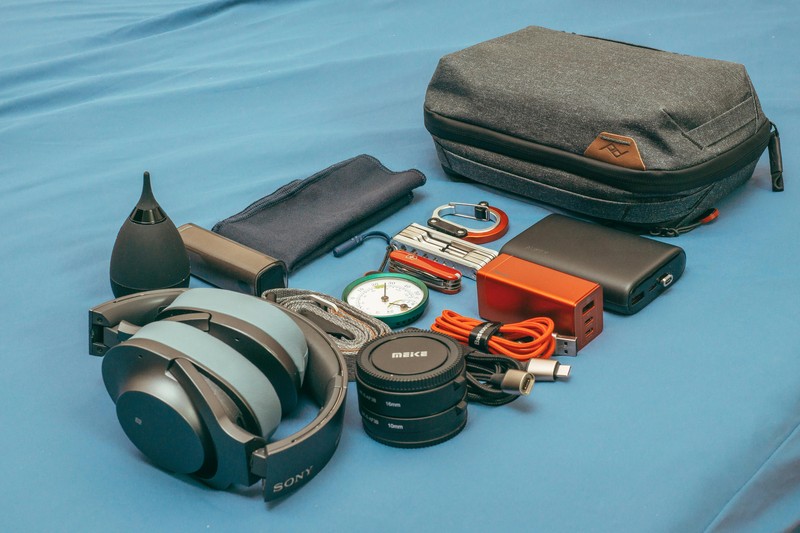
Your app setup is only half the battle. If your phone dies at 6 PM, you’re not seeing any messages. Here’s the gear that keeps your tech running and your trip organized.
Portable power bank (at least 20,000mAh). Group trips burn through phone batteries. Between checking maps, sending messages, and taking pictures, you’ll be hunting for an outlet by mid-afternoon. A high-capacity power bank keeps your phone alive for the full day’s activities. Look for one with multiple USB ports so you can charge your phone and someone else’s at the same time. For groups spending long days out, a reliable power bank with plenty of capacity is a simple upgrade that prevents the dreaded low-battery scramble.
RFID-blocking travel wallet. When you’re splitting costs and handling cash for the group, you’ve got more than your own money on you. An RFID-blocking wallet protects against skimming at crowded venues. It also keeps your cards and cash organized so you’re not digging through your bag at the bar. If you’re dealing with group expenses at busy spots, a slim travel wallet with RFID protection can give you peace of mind.
Compact Bluetooth speaker. The pre-game, the beach hang, the late-night chill sessionâsome of the best moments of the trip happen between planned activities. A small, water-resistant speaker makes those moments better. Look for something that fits in your daypack but still delivers decent sound.
Universal travel adapter. If you’re crossing borders, you need to keep everyone’s devices charged. A universal adapter with multiple USB ports lets you share a single wall outlet among three or four people. It’s a small thing, but it eliminates the ‘who gets to charge first’ negotiation.
None of these are flashy. They’re practical tools that solve the inevitable problems of group travelâdead phones, disorganized wallets, and awkward silences that could use a soundtrack.
Final Verdict: What to Use for Your Next Party Trip
If you want the safest, most universally compatible option for a standard group trip, use WhatsApp. It’s the app nobody has to learn, it works everywhere, and it handles the basics well. For most groups of two to thirty people, it’s the right call.
For large groupsâsay 20 to 200 peopleâor trips where you’re sharing tons of photos and itineraries, Telegram is your pick. The file sharing and Channels alone make it worth the download.
And for the planners among usâthe ones who want structure, searchability, and a clean separation of topicsâSlack is your play. It’s overkill for a weekend, but for a week-long trip with complex logistics, it’s a lifesaver.
Compare your top two options based on your group size, your planning style, and your group’s tech tolerance. The best app is the one your whole crew will actually use. Everything else is just noise.